Getting a business owner from "sign up" to "sold something" on Moniebook
Nine in ten Nigerian business owners keep no real books. Getting one of them to trust Moniebook with those books starts in the first five minutes, before they've seen a single report. This is the work of designing that first five minutes...

Role
Senior Product Designer
Timeline
Continuous
Team
Moniebook Onboarding team
Platform
Web
Software isn't what's stopping most business owners from keeping books
Nearly nine in ten Nigerian business owners keep their books informally or not at all, and one in seven can't state a typical monthly profit when asked directly. Free accounting apps have existed for years and reached about 2% of them. That's not a demand failure, it's a supply failure: the market rejected the homework, not the outcome.
Moniebook's bet is that a bank that already sees the money move can write the books itself, if a business owner will just get through the door. Onboarding is that door. Two thirds of owners say they're open to a better tool, but our own research into digitally onboarded merchants found the account setup, while functional, "required them to read real closely to every requirement", and a personal name appearing alongside the business name on the account was enough of a trust breach that some merchants moved to a competitor over it. Onboarding wasn't broken, but it was asking more attention and trust than a first-time user reliably gives.
There's also a second onboarding problem hiding behind the first: not every business owner can finish setup alone. Some have no digital inventory record to upload at all. Designing for that business meant designing a second path, assisted by a human, that had to feel like a continuation of the same product rather than a dead end.
Research: Watching where trust breaks, not just where clicks fail
I ran a UX research plan visiting business owners in their own shops to watch first impressions and early usage directly, rather than relying on support tickets alone. Two things came out of that work and the WhatsApp complaint channel we tracked alongside it.
First impressions are make or break
The interview guide's first section was deliberately just onboarding: how they got started, whether it was confusing, and the exact moment they weren't sure what to do next. A rough first five minutes colours every session after it.
"Smooth" still has friction in it
Merchants described the account setup as easy to follow but requiring them to read closely at every step, a sign the flow was correct but not yet effortless.
Identity is non-negotiable
A business account showing a personal name alongside the business name was enough of a credibility problem that some merchants explored other banks over it. Trust, in this segment, is partly a naming problem.
Workflow trust, not feature gaps
Of the onboarding complaint signals we tracked over one reporting period, 92.5% were bugs rather than missing features, concentrated in OTP reliability, task visibility, and whether a KPI or commission had actually registered. Business owners and the field team lose trust in the process itself, not in what it's missing.
What I Owned: Both paths through the door
I designed the self-serve setup flow a business owner completes alone, and the assisted path that takes over when they can't, working alongside the Onboarding & Distribution product and engineering pod in a biweekly product review.
Self-serve setup: Business name, phone number, category and sub-category capture, with marketing consent folded into the same screen rather than a separate prompt.
Inventory import: A drag-and-drop bulk upload for a business's existing product list, accepting the file formats a small business actually has on hand (JPG, PNG, PDF, XLSX, XLS, CSV, TXT).
Assisted onboarding: The fallback flow for a business with no inventory data: requesting a physical Data Entry visit, and the Business Owner's OTP authorisation for being charged for it.
Task status visibility: The status badges a business owner sees on their own dashboard while a Data Entry or Implementer task is in flight, so waiting doesn't feel like nothing is happening.
Subscription checkout: The line-item breakdown and payment screen that turns a completed setup into an active, paying account.
Copy & consent: Onboarding and terms-and-conditions copy, including the decision to present terms as a feature upgrade rather than a legal wall.
Deep Dive: The setup screen: four fields, one consent, no dead ends
This is the first real screen after sign-up. Research said owners were reading every word closely rather than moving fast, so the goal wasn't to remove fields, it was to make every field obviously safe to answer.
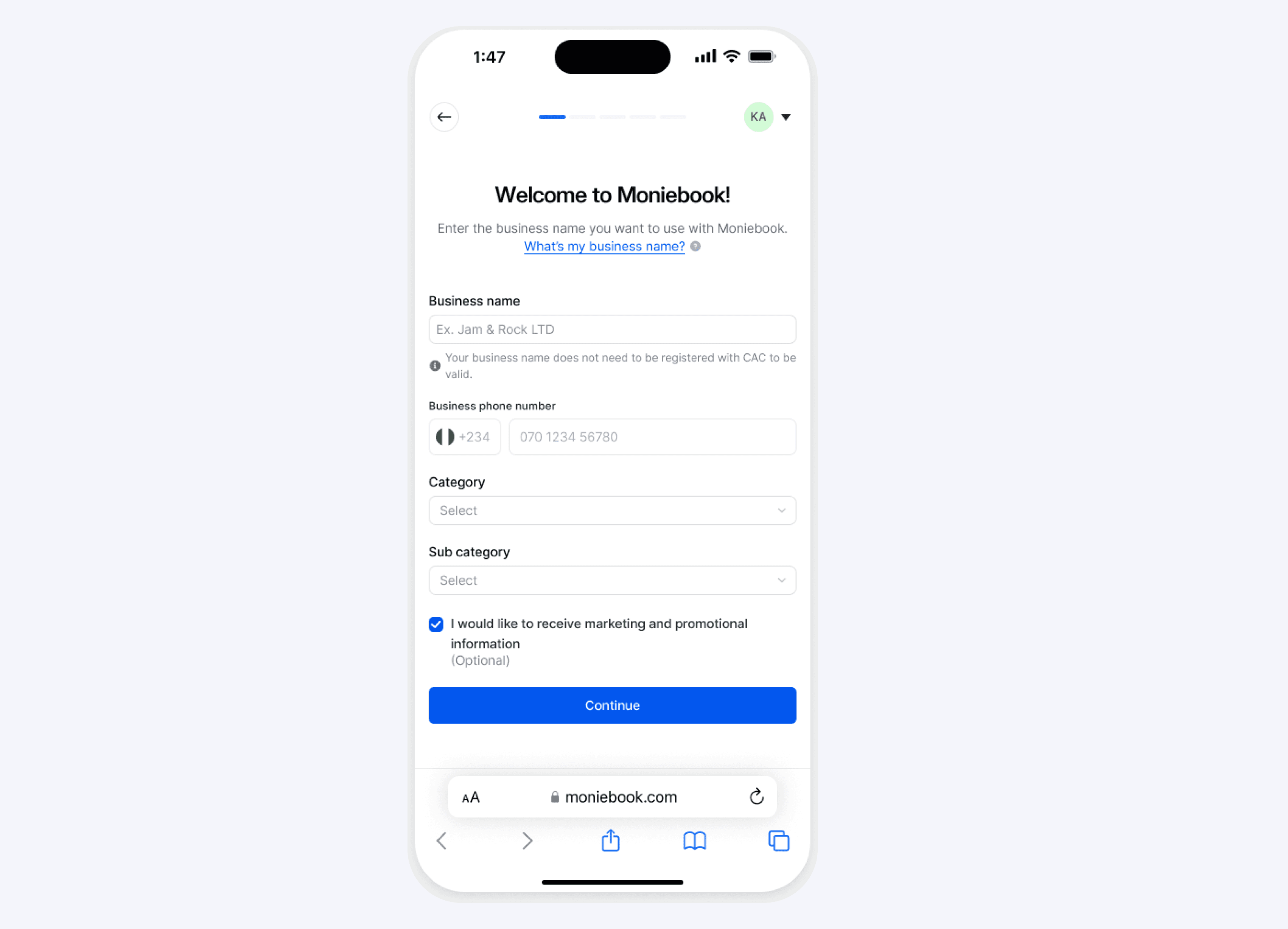
Answering the trust question before it's asked
"Your business name does not need to be registered with CAC to be valid" sits directly under the business name field, pre-empting the exact hesitation an informal or unregistered business owner would have at that field.
A help link instead of a tooltip
"What's my business name?" is a full inline link, not a small info icon, because this is the field most likely to make someone stop and think rather than type. It gets weight proportional to how often it trips people up.
Consent, not a wall
Marketing consent is a single optional checkbox inside the same form, checked by default, rather than a separate interstitial. The team's later decision on the Lite terms and conditions followed the same logic: present it as a feature upgrade, not a legal barrier the owner has to clear.
Progress made visible
The dots at the top of the screen (visible in the real screenshot) tell a business owner how much is left before they're through, a small but deliberate answer to research showing this segment reads closely and wants to know what they're committing to.
Two ways to get a business's inventory in
Every business owner is asked to get their existing products into Moniebook. Some can upload a file themselves in under a minute. Some have no digital record at all, just a shop and a memory. Both had to end in the same place: a working account.
Business owner reaches the inventory step
After account setup, the owner is asked to import their existing inventory so Moniebook can generate real reports from day one instead of an empty dashboard.
Path A — self-serve upload
A drag-and-drop uploader accepts whatever file format the business already has, spreadsheets, a PDF price list, even a photo of a handwritten stock sheet, up to 2MB per file within a 20MB total allowance.
Path B — no digital record exists
If the business has nothing to upload, a BRM can request a physical Data Entry visit on the owner's behalf, so the lack of a file never blocks the account from activating.
The business owner stays in control
The Business Owner authorises the physical visit and accepts the associated daily charge themselves, via OTP, so a decision an agent makes in the field never commits the owner's money without their direct say-so.
Status, visible the whole time
The task moves through visible states on the owner's own dashboard rather than disappearing into a backend queue, so waiting for a human doesn't feel different from waiting for a file to process.
When onboarding needs a human, not just a file picker
The assisted path exists for the businesses self-serve can't reach, and it's documented in Figma the same way every other feature is: a PRD-linked cover card with the user stories that justified it, right next to the screens.

Let the field team unblock a business
A BRM can request a physical Data Entry agent for a business with no inventory data, so a missing spreadsheet never stalls the account.
Keep the charge decision with the owner
The Business Owner authorises the visit and the daily charge themselves via OTP, the same one-time-password pattern used elsewhere in the product, so the field process never quietly commits the owner's money.
The uploader itself
For the businesses who can self-serve, the import screen states the size allowance and accepted formats up front rather than after a failed upload, since a rejected file on a slow connection is one of the fastest ways to lose a first-time user.
Making a human-speed task feel like it's still moving
A file upload finishes in seconds. A physical Data Entry visit takes days. Both needed to live as the same kind of object on a business owner's dashboard, a task card with a status, not two different mental models.
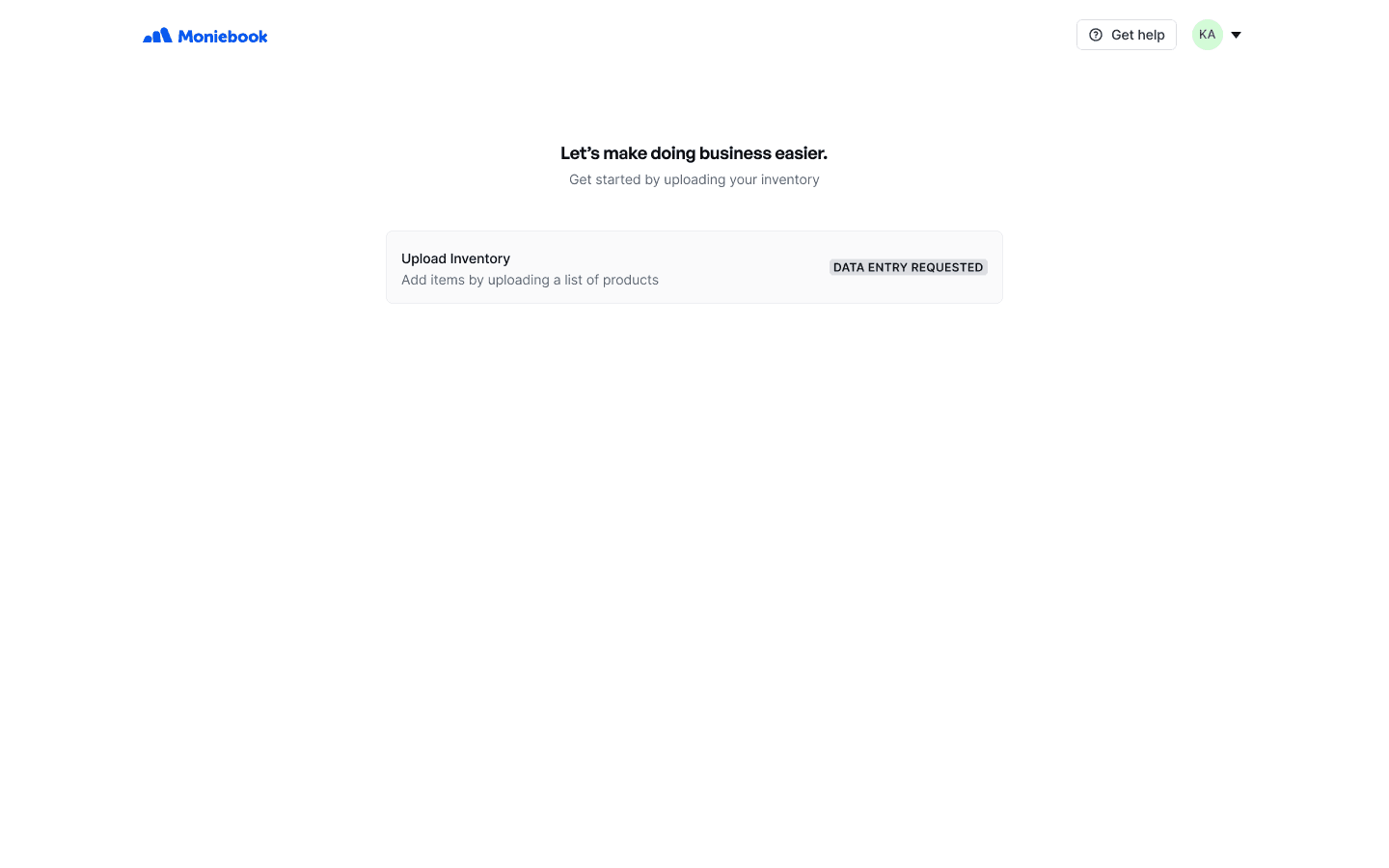
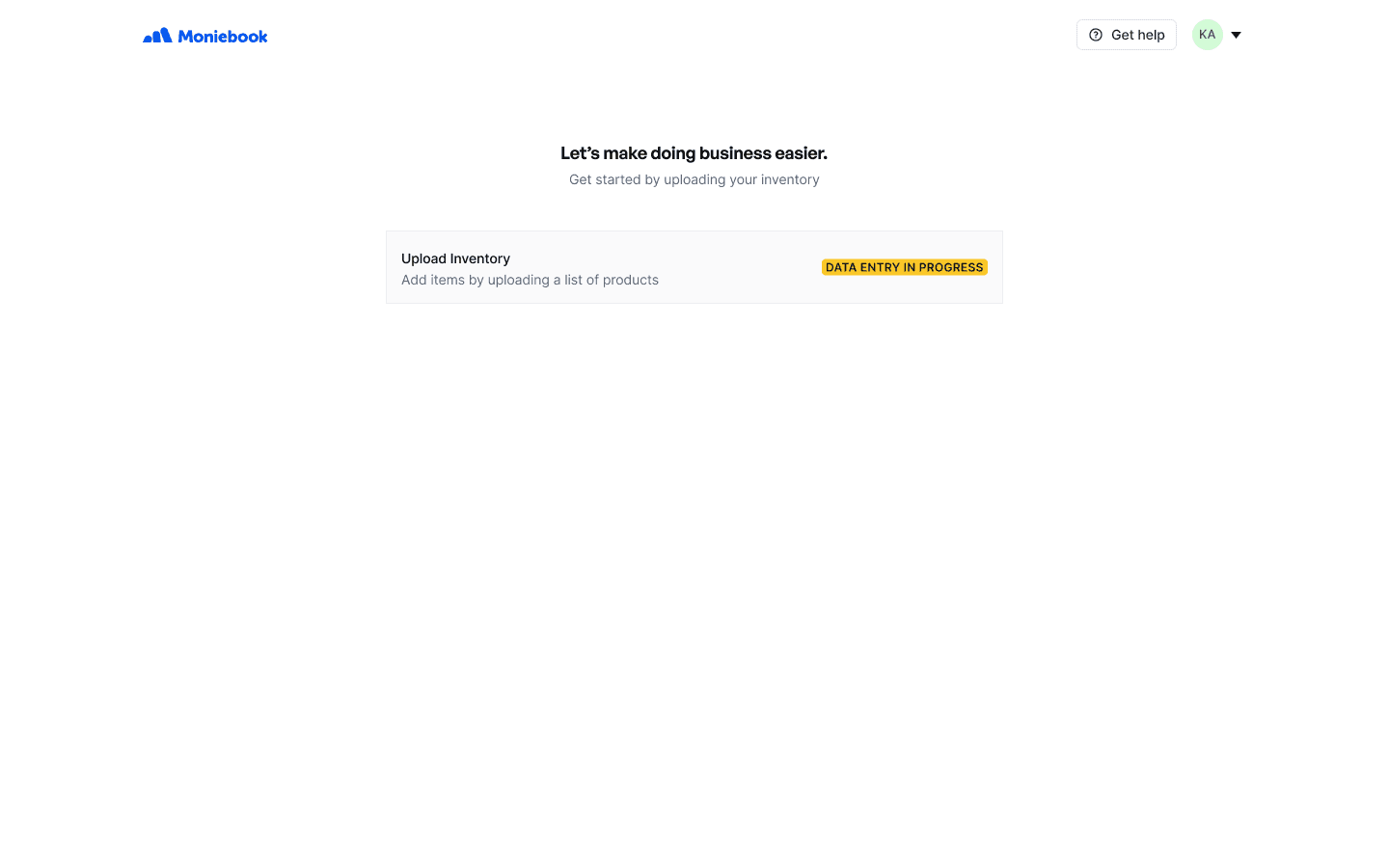
One card, several lives
The same "Upload Inventory" task card carries the status forward from requested through in progress, so a business owner checking back after a few days sees continuity rather than a new, unexplained item.
Colour does real work here
Grey for "requested" and amber for "in progress" is a small distinction, but it's the difference between a business owner assuming nothing has happened yet and knowing someone is actively on it.
Grounded in the field team's own status list
These two states are the visible tip of a longer status list the field team tracks internally, including holds for an unready business, insufficient staff, or an unresponsive owner. Surfacing even a simplified version of that list to the business owner was a deliberate choice: showing "in progress" honestly, even when the truth is "on hold for another two weeks," beats a silent gap the owner has to chase down themselves.
Turning a finished setup into a paying account
Once setup is complete, the flow ends at a subscription checkout. A business owner who has just handed over their inventory and phone number is in no mood for a vague bill, so every line on this screen has to be traceable back to something they actually chose or already have for free.
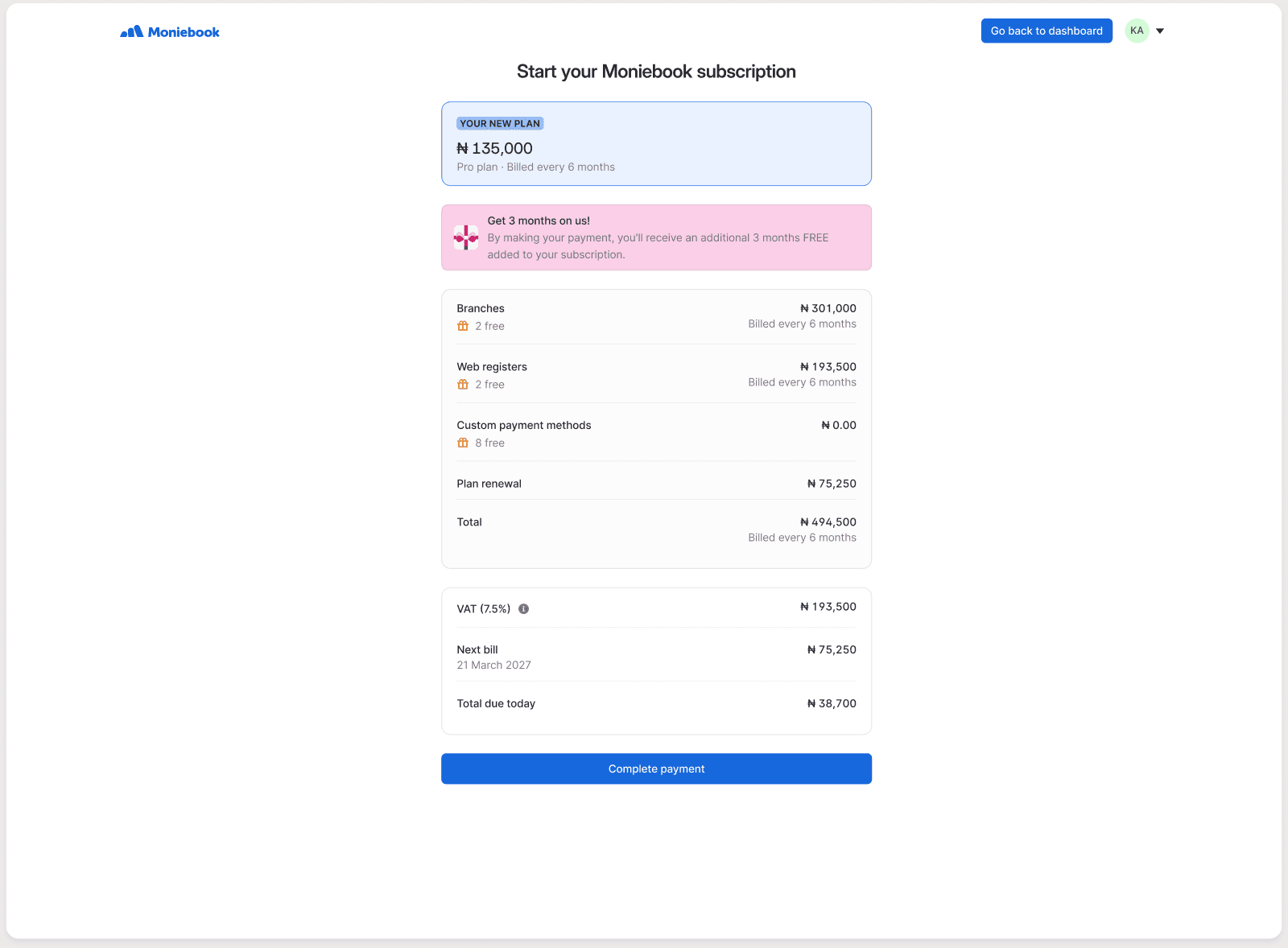
Free allowances, shown as free
Branches, web registers, and custom payment methods each show their free tier ("2 free", "8 free") right next to the price, so the bill reads as "here's what you're using beyond what's included" rather than an unexplained total.
Today's charge, separated from the plan
"Total due today" sits apart from the six-month plan total and the next bill date, so a business owner paying for the first time isn't left calculating what actually leaves their account right now.
The incentive earns its place
The three-months-free banner sits directly above the pricing breakdown it affects, timed to when the owner is already looking at the number, not as a pop-up earlier in the flow where it would compete with the setup task itself.
What happens off-screen when self-serve isn't enough
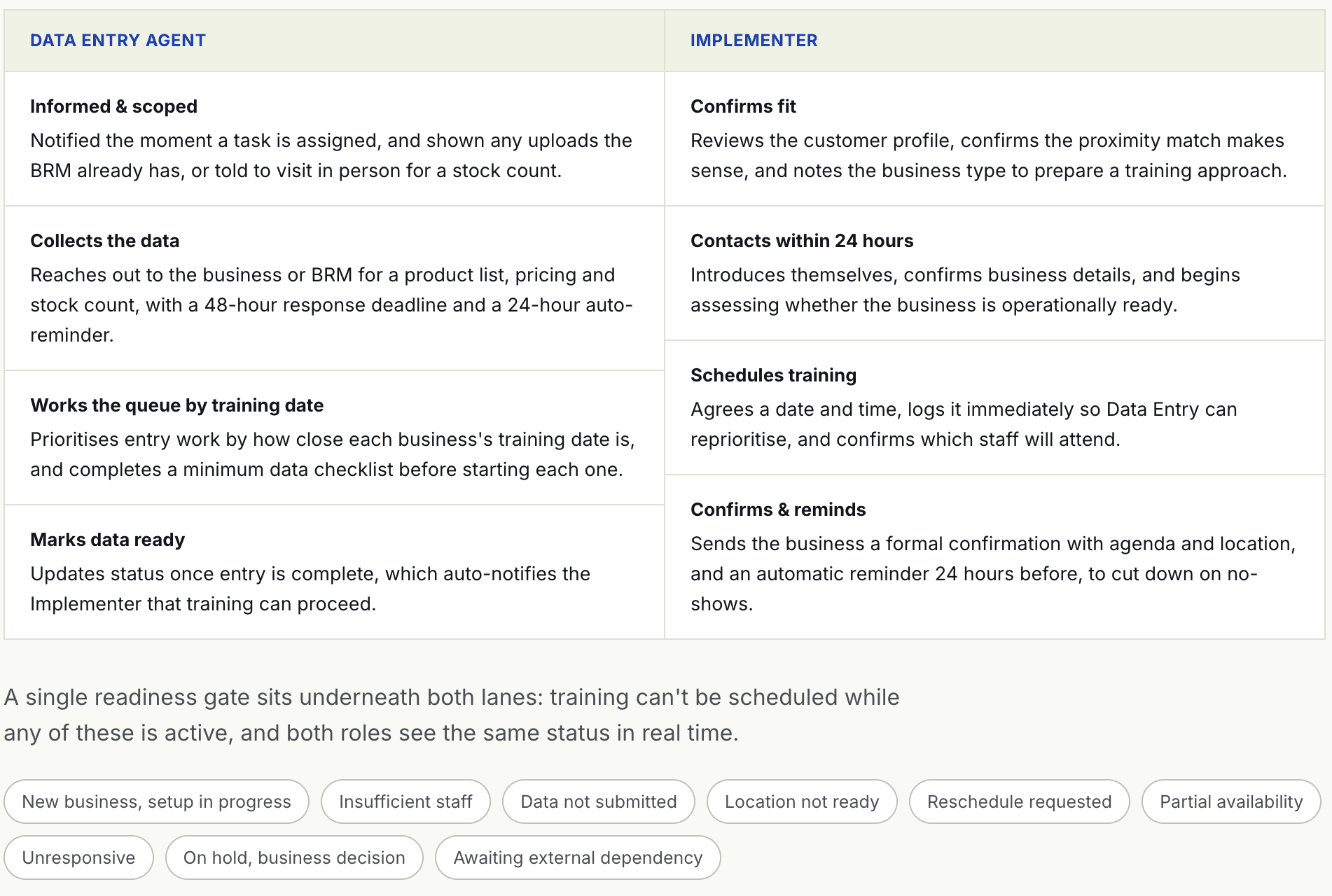
The assisted path is really two field roles working in parallel against a shared readiness gate, documented as a swimlane so Data Entry and Implementer work stay in sync without either side blocking the other.
What the WhatsApp complaint channel actually told us
The onboarding and field teams run an internal WhatsApp channel where issues surface in real time. One reporting period logged 41 signals, 40 complaints and 1 feature request, and the shape of them says more than any single fix does.
Theme | Signals | What it actually meant |
|---|---|---|
KPI, commission & attribution trust | 16 | BRM dashboards not reflecting activity, onboarding progress reading as stuck, commissions missing, all of which erode the field team's confidence that their work is being counted. |
OTP & verification reliability | 10 | OTP delivery, validation and formatting failures blocking onboarding and implementation steps, often at the business's own location. |
Task visibility & continuity | 11 | Businesses or tasks not found in search, abandoned tasks invisible to the next agent, assignments failing to stick. |
Wallet, top-up & subscription blockers | 3 | Ambiguity at the exact moment of conversion, missing subscription buttons and double-charge risk right at checkout. |
92.5% of the complaint signals in this period were bugs, not missing features. Read plainly: the shape of onboarding was largely right, but the field team and business owners were losing trust in whether the system was doing what it claimed, KPI counted, OTP delivered, task actually assigned. That's a different fix than a new feature, and it's exactly the "workflow trust" framing the report used to describe it.
Tariq