Designing the books behind Moniebook Accounting
How I helped take Moniebook's accounting module from six kitchen-table interviews about naira and notebooks to a full double entry system, journal entries, an income statement, a chart of accounts, and the approval chains around them, for merchants who had never trusted a screen with their profit before.

Role
Senior Product Designer
Timeline
Continuous
Team
Moniebook, Accounting pod
Platform
Web
Merchants were running real businesses on notebooks, memory, and hope
Moniebook already handled sales and inventory for a large base of Nigerian merchants. What it couldn't tell them was whether they'd actually made money. Accounting was the missing layer, and it was framed internally not as a feature but as the "financial operating system" of the business.
The team's own stakeholder brief put the goal in one sentence: give every merchant a complete, real time view of their cash flow and financial performance, automatically and accurately, without needing an accountant to spend a week building a spreadsheet. That meant replacing manual reconciliation with a live pipeline, and replacing a pile of receipts with financial reports that generate themselves: income statements, balance sheets, cash flow, all built on a proper double entry ledger.
The catch is that a wrong number in accounting is worse than a missing feature. So a lot of what shipped in the first several months was invisible by design, the event pipeline, the ledger, the account structures, before any of it reached a screen. My job was to design the layer merchants would actually see and trust once that foundation was ready.
What business owners actually do at closing time
Before any screen existed, the team ran two rounds of interviews with business owners across hospitality, retail, telecoms, and distribution, six businesses each round, to understand how they currently tracked profit and what an automated report would need to do to earn their trust.
The pattern was consistent: businesses were running a parallel, manual accounting system next to the digital tools they already had.
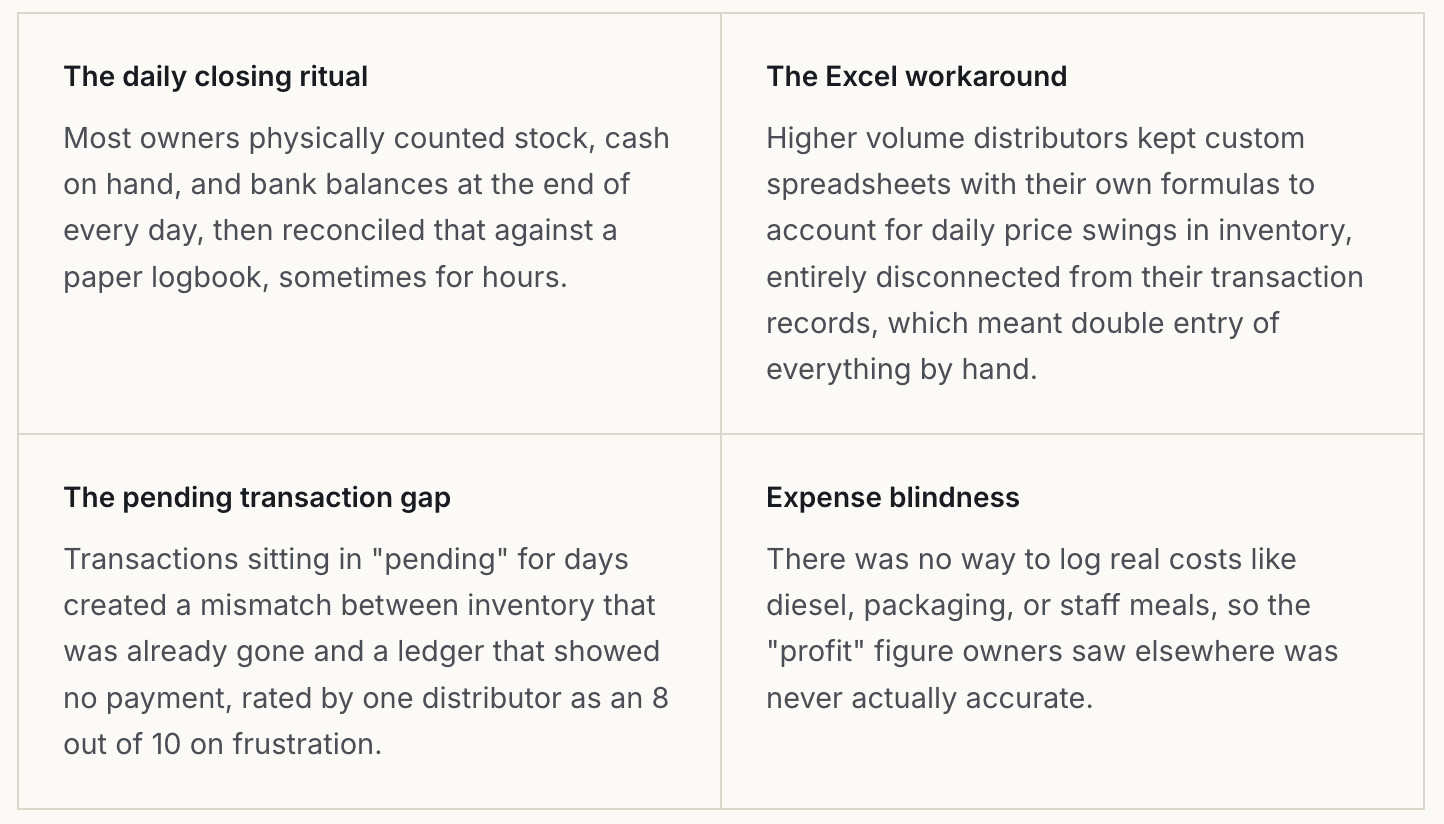
Owners were also unusually specific about how they wanted the answer delivered: numbers over graphs (total sales in naira, net profit in naira, not a percentage or a chart), pushed to them automatically by email rather than pulled on demand, and built on a record they could trust wasn't quietly being altered. That last point, transaction integrity, came up as the actual foundation everything else depended on: a business owner who has been burned by other software before will not adopt a fast feature built on a ledger they can't trust.
Those findings became the brief for the two features I want to walk through in detail below: journal entries, and the income statement.
Design across the whole ledger, not one feature
I worked as the sole product designer embedded with the Accounting pod, sitting in team OKR reviews alongside the product manager, engineering lead, QA, and SRE, and running a weekly design QA pass resolving Figma comments directly against the PM's line by line checks of every screen.
Core ledger: Chart of Accounts across all five account types (assets, liabilities, income, expenses, equity), including account creation, editing, and disconnect flows, plus PDF export of the full COA or a single account.
Journal entries: Manual double entry creation, draft and post states, and the reverse, delete, and void flows accountants need for corrections without breaking the audit trail.
Reporting: The income statement (profit and loss report), including summary and account level detail views, and a compare periods mode.
Transactions: The transaction list and its ten plus empty and detail state variants, manual transaction creation and editing for income, expenses, and internal transfers, CSV and PDF export.
Expense bills: Bill creation, a four state payment lifecycle (draft, unpaid, partially paid, overdue), and the approval workflow that routes bills through manager and admin review, rejection, reassignment, and override.
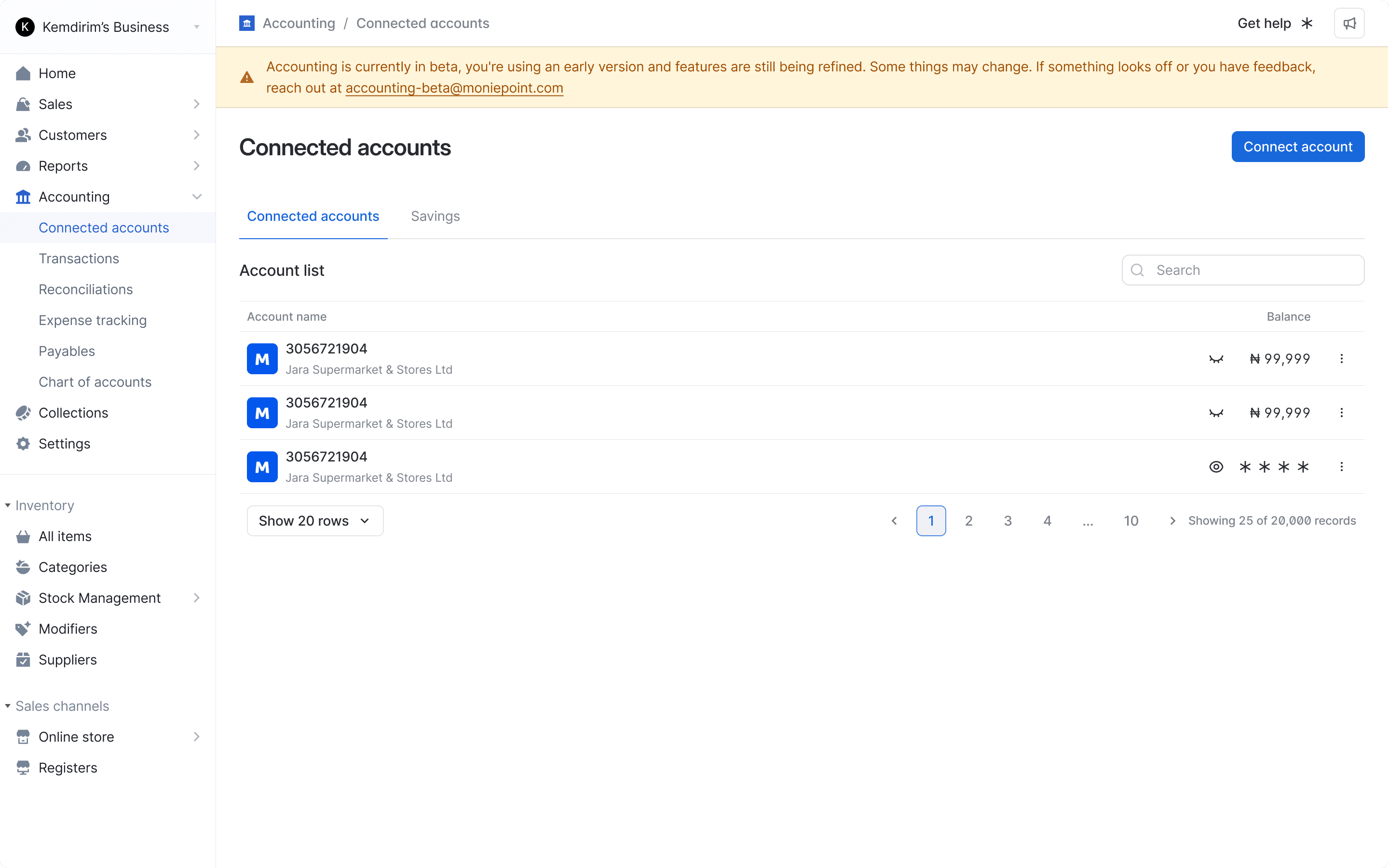
Connected accounts: Linking bank and savings accounts into the ledger so their balances reconcile against Moniebook's own records.
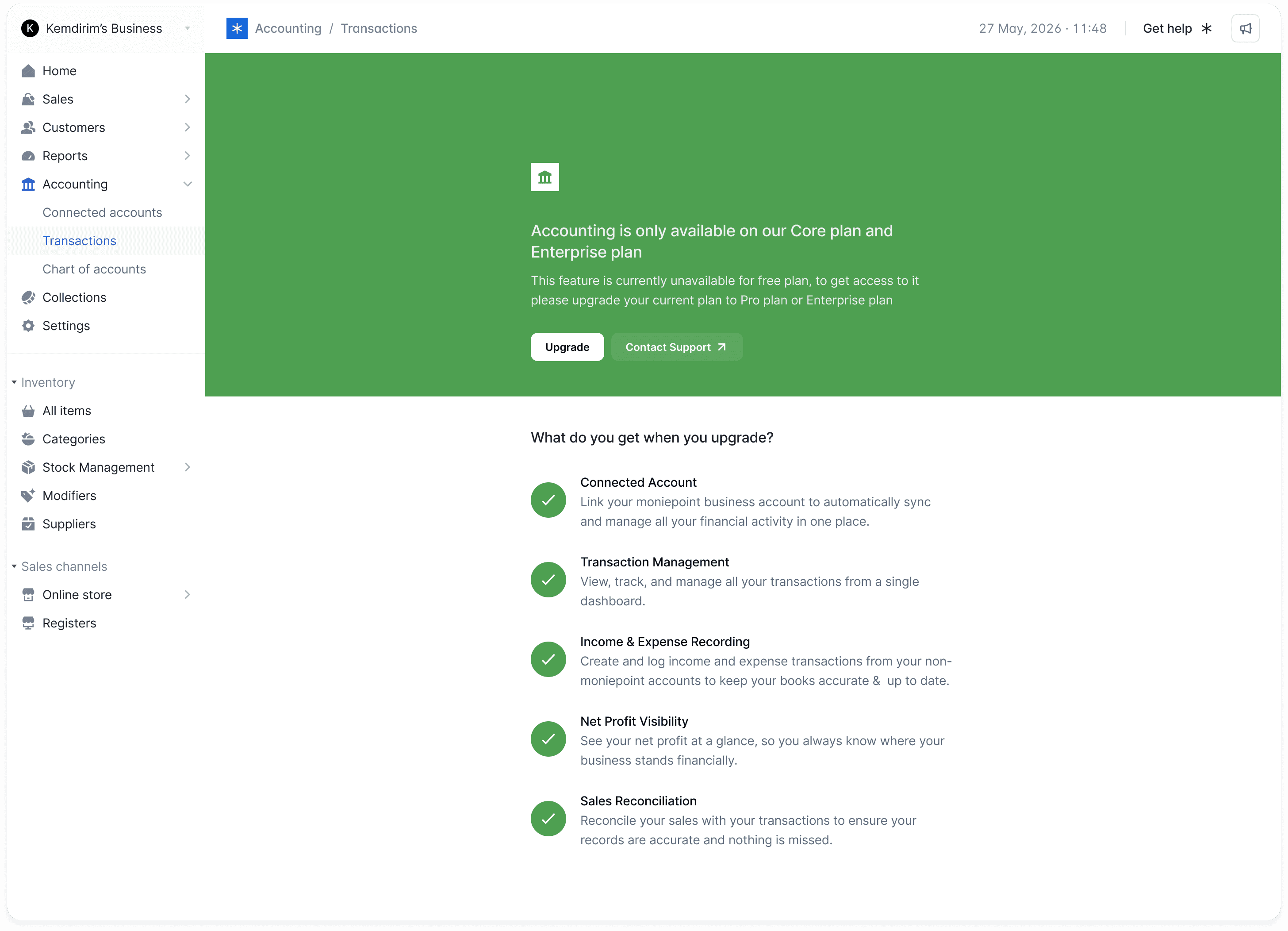
Rollout controls: Paywall states for plan tier gating and a beta banner pattern used to ship features to a limited audience first.
Journal entries: giving accountants an escape hatch
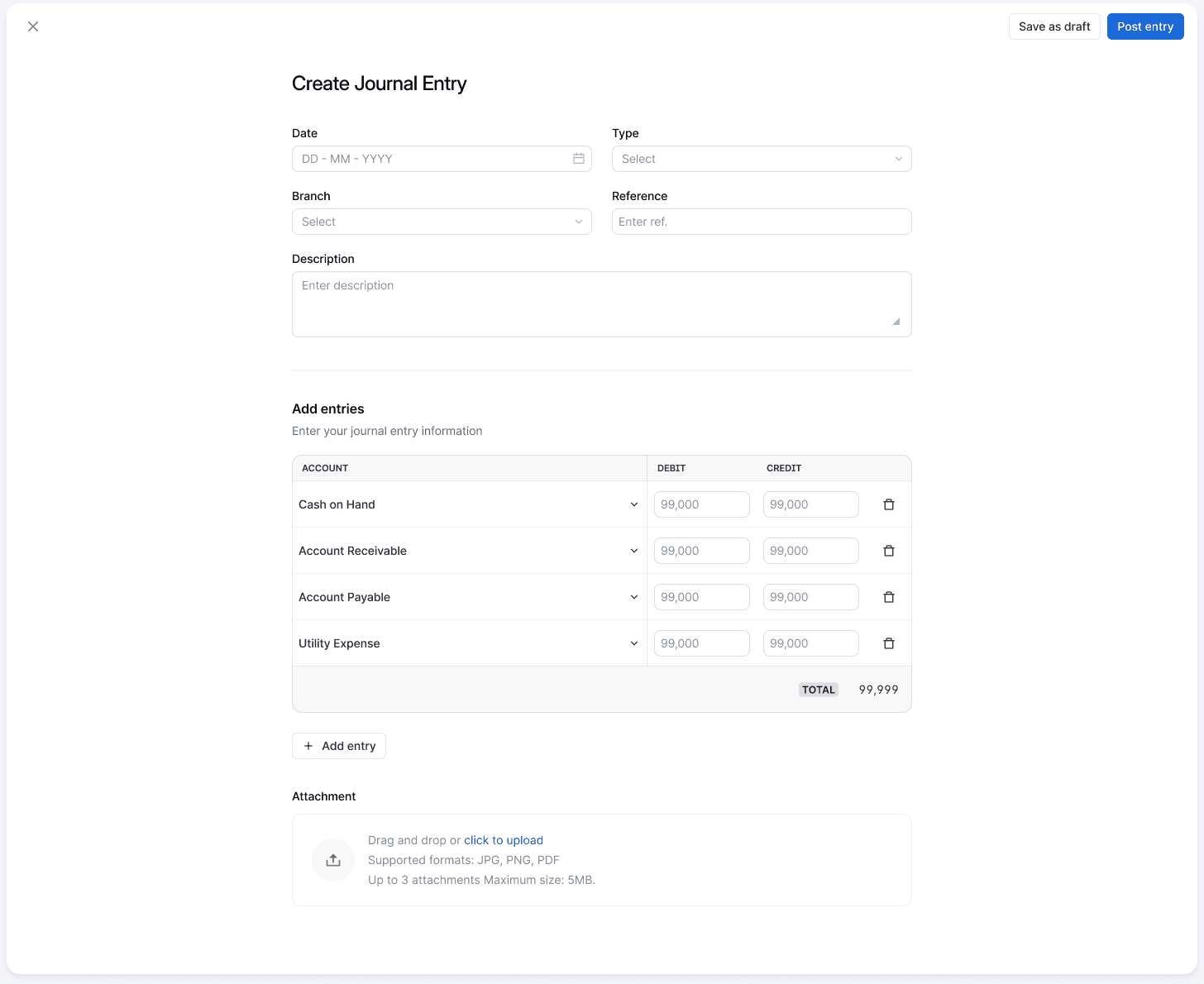
Not every financial event fits neatly into a sale or a transfer. Accruals, depreciation, corrections. Accountants needed a way to record these directly against the chart of accounts, with the same rigor as an automated posting: every entry has to balance before it can be posted.
Create a journal entry
An accountant selects accounts from the chart of accounts and enters debit and credit amounts line by line, so accruals, depreciation, and corrections have a home outside the automatic transaction pipeline.
Post a balanced entry
The total row makes the debit and credit columns visibly reconcile before posting is allowed. Posting commits the entry to the books and updates the relevant account balances immediately, matching how the underlying ledger service enforces "ledger should be balanced" as an integrity rule.
Draft, then commit
Save as draft and Post entry are deliberately separate actions in the header. A half finished correction shouldn't touch live balances, but once posted, an entry needs its own undo path rather than silent editing, which is why reverse, delete, and void exist as distinct flows elsewhere in the file rather than one generic "edit."
Attachments as evidence
Every journal entry can carry up to three supporting files. For a merchant who told researchers that an untamperable record was the one thing that mattered, giving an accountant somewhere to attach the receipt behind a manual correction is a small design decision doing real trust work.
The income statement: one formula, then the receipts
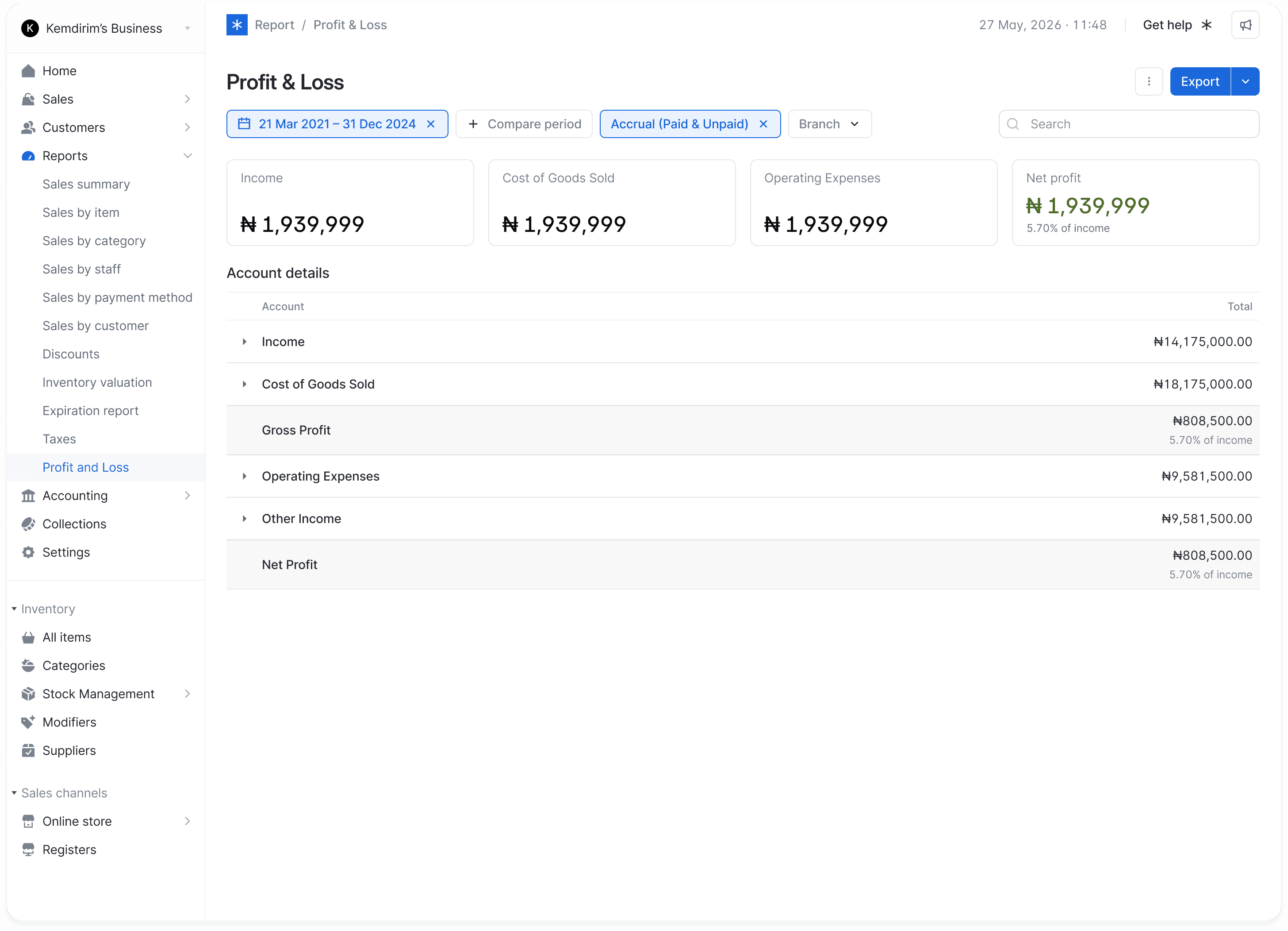
Research had been blunt about this: owners wanted a number, not a chart. The P&L report needed to answer "did I make money" in one glance, while still giving an accountant a way to trace that number back to individual accounts.
The headline formula
Income, cost of goods sold, operating expenses, and net profit sit as four cards at the top of the report, a single equation a business owner can read without opening anything, directly answering the "numbers over graphs" preference from research.
Summary, with percentages
Below the headline, a section level breakdown shows gross profit and net profit as a percentage of income alongside the naira amount, so performance is assessable without scrolling through every account.
A details view for accountants
The same report breaks down by individual chart of accounts entry in a details tab, so an accountant can identify exactly which revenue streams or expense categories are driving the top line number.
Compare periods
A separate mode lets a date period component drive a side by side table of two ranges plus the change in profit between them, for an owner asking "am I doing better than last month" rather than "how am I doing right now."
Getting the categorisation right, twice
This report went through a second, less visible round of work later in the year: correcting the order of income, cost of goods sold, gross profit, other income, and operating expense sections, and moving miscategorised items like inventory gain out of "other income." Accounting is a category of product where the design isn't done when it ships, it's done when every number in it is defensible.
Manual transactions: the fallback for everything the automatic pipeline misses
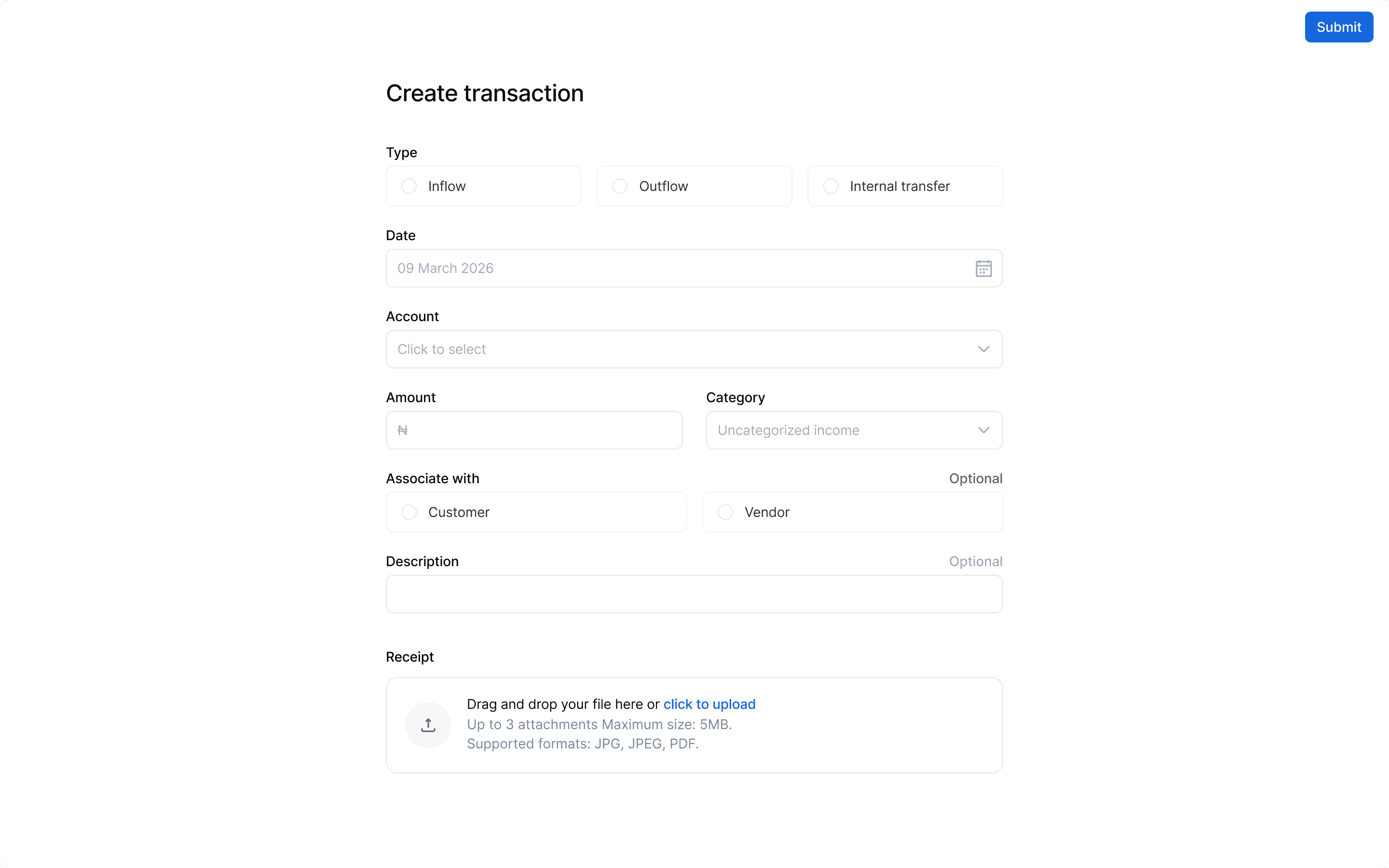
Most of what lands in the ledger arrives automatically from sales and CBA events. But a business owner also pays a supplier in cash, moves money between two of their own accounts, or takes a delivery that never touched a register. Manual transaction entry, and the connected accounts underneath it, needed to feel just as fast as the automatic path.
One form, three intents
Inflow, outflow, and internal transfer sit as a single radio choice up top rather than three separate flows, so a merchant learns one form instead of three, and the category field defaults sensibly (uncategorised income) rather than forcing a decision before the amount is even entered.
Associate with, kept optional
Tagging a transaction to a customer or vendor unlocks reporting later (who owes you, who you owe), but research was clear that owners wanted speed at the point of entry. Making the link optional here, and letting it be added later, kept the core form fast.
Connected accounts underneath
Every manual transaction posts against a real account from the connected accounts list, mirroring the same edit and disconnect patterns used for chart of accounts entries elsewhere in the file, shown below at actual size.
Everything the ledger needed around it
Journal entries and the income statement are the two features most visible to a business owner, but a double entry system needs a lot of scaffolding around it before either can be trusted. The rest of the file covers that scaffolding.
Chart of Accounts
Assets, liabilities, income, expenses, and equity, each with create, edit, and disconnect flows, plus export of the full chart or a single account as PDF.
Expense bills
Bill creation and a four state payment lifecycle, draft, unpaid, partially paid, and overdue, feeding into a manager and admin approval chain with rejection, reassignment, and override.
Transactions
Ten plus empty and detail state variants covering manual income, expense, and internal transfer entries, alongside the automatic transactions arriving from the sales and CBA pipelines.
Connected accounts
Linking external bank accounts and, later, savings accounts, so their balances reconcile against Moniebook's own ledger rather than sitting outside it.
Category management
Creating and archiving categories used to classify transactions, with rules to stop an archived category from being reassigned to new activity.
Rollout controls
A paywall pattern for plan tier gating and a beta banner used to ship new report types to a limited audience before a full release.
What the support queue told us as the product matured
The team tracked accounting related complaints from the merchant support channel every two weeks. I'm including this because it's an honest picture, not a highlight reel: the mix of complaints shifted over the months, and reading it says more about where the product actually stood than any single ship date does.
Period | Volume | What dominated |
|---|---|---|
1–7 Jun | 7 | Feature gaps: exporting records, viewing profit rather than raw income, monthly reporting. Plus one transaction visibility bug. |
15–28 Jun | 10 categories | Role permission confusion took over: 9 of 10 logged issues were the accounting feature being enabled but hidden by a permission setting, not actually missing. |
29 Jun–12 Jul | 10 | Requests for the fuller module, balance sheet and trial balance, still in phased rollout, plus continued export follow up. |
1–31 Jul | 21 | Negative net profit and profit calculation confusion became the largest single category (6 cases), alongside plan access questions and payroll requests that were explicitly out of scope. |
1–18 Aug | 31 | Access and enablement requests from relationship managers dominated (18 of 31), a sign of rollout friction more than product friction, plus a smaller run of expense auto categorisation complaints. |
Two things stand out reading this back. First, the "is this even working" questions from June (visibility bugs, missing exports) had mostly disappeared by August, replaced by access and workflow questions, a reasonable sign the core screens had stabilised. Second, "negative net profit" complaints in July were the direct trigger for the P&L categorisation rework above, a good reminder that a report can be pixel perfect and still mislead someone if the underlying category logic is wrong.
Designing on top of a ledger that has to be right
None of the screens above matter if the numbers behind them are wrong. Some of what the engineering side of the team shipped in parallel, worth naming because it shaped what I could responsibly design on top of.
Integrity checks
Every ledger must sum to its account balances
Every ledger entry must be balanced before posting
Account balance snapshots run on a schedule to catch drift
Event pipeline
Sales, refunds, outstanding balances, and partial payments ingested in real time
Inventory valuation and cost of goods sold derived automatically
All CBA (core banking) income and outflow events consumed continuously
This is also why a beta warning banner exists on accounting pages, and why phased rollout via a paywall pattern mattered more here than on a typical feature: shipping an inaccurate financial report to a merchant is a worse outcome than shipping nothing at all.
Tariq